
3 Products
Networking devices are essential tools that connect computers, smartphones, and other devices to create seamless communication and data sharing. These include routers, switches, modems, and access points—each playing a key role in building stable, high-speed networks for homes and businesses. Reliable networking devices ensure fast, secure, and efficient internet connectivity.
Networking Devices
Networking devices are essential tools that connect computers, smartphones, and other devices to create seamless communication and data sharing. These include routers, switches, modems, and access points—each playing a key role in building stable, high-speed networks for homes and businesses. Reliable networking devices ensure fast, secure, and efficient internet connectivity.
1
50% off
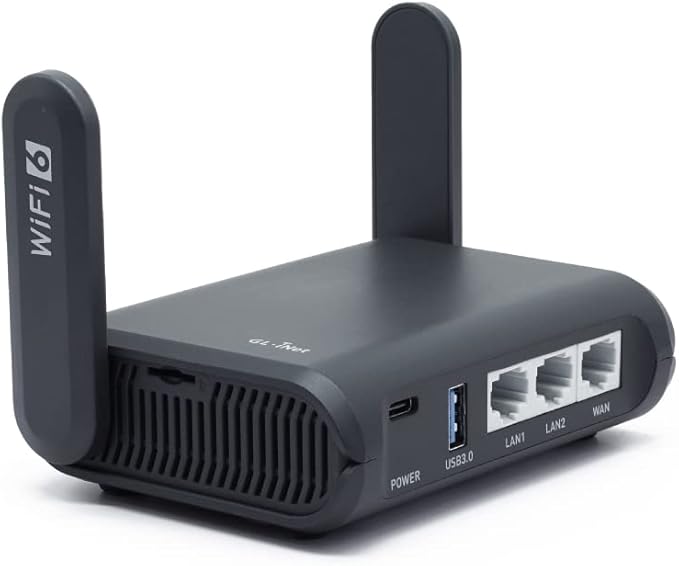
GL.iNet GL-AXT1800(Slate AX) Portable Gigabit Travel Router, Pocket-Sized, Wi-Fi 6, Extender/Repeater for Hotel&Public Network Storage, VPN Client&Server, OpenWrt, Adguard Home, USB3.0,TF Card Slot
About this item
【Fast and Secure Browsing】Slate AX wifi 6 router supports IPV6; OpenVPN & WireGuard pre-installed, compatible with 30+ VPN service providers, OpenVPN speed up to 120 Mbps; WireGuard speed up to 550 Mbps. Cloudflare encryption supported to protect the privacy.
【Easy File Sharing】Our NAS feature supports SAMBA and WebDav protocol. By plugging an external USB hard disc into the router, you can create a private network to store and share your documents in this wifi 6 router.
【Runs on OpenWrt 21.02】Slate AX wifi 6 router runs on the latest OpenWrt 21.02 operating system (Kernel version 4.4.60), with mass device connection capabilities, and significantly reduced signal interference. You can customize the router and install applications based on your preferences.
【Repeater for Public WiFi】Slate AX wifi 6 router allows you to convert a public network(wired/wireless) to a private network(wired/wireless) for secure surfing. (Note: Please reconnect your router if you pass the time limit of using Public Wi-Fi hotspot.)
【Enable VPN or AdGuard Home Easily】Immediately enable/disable your selected feature(AdGuard Home or OpenVPN Client or WireGuard Client) through the physical toggle switch. ***The default setting of the button is NO Function, you need to set it in the admin panel before using this function.
2

50% off
GL.iNet GL-MT3000 (Beryl AX) Small Portable Wifi 6 Router, Dual Band Gigabit Wireless Router for Home & Travel, Wifi Speed up to 3000 Mbps, VPN Cascading / IPV6/ WPA3, 2.5Gbps WAN Port, AdGuard Home
About this item
***Please upgrade the firmware to the latest version to maximize the product performance.***
【DUAL BAND AX TRAVEL ROUTER】MT3000 wifi 6 router packs with US, UK, EU Plug; Dual band network with wireless speed 574Mbps (2.4G)+2402Mbps (5G); Tethering Compatible; 2.5G Multi-gigabit WAN port and a 1G gigabit LAN port; USB 3.0 port; WIfi 6 offers more than double the total Wi-Fi speed.
【VPN CLIENT & SERVER】OpenVPN and WireGuard are pre-installed, compatible with 30+ VPN service providers. Simply log in to your existing VPN account, and Beryl AX automatically encrypts all network traffic within the connected network. Max. VPN speed of such wifi 6 router is 150 Mbps (OpenVPN); 300 Mbps (WireGuard).
【OPEN SOURCE & PROGRAMMABLE】Runs on open-source OpenWrt 21.02 firmware, supporting more than 5,000 ready-made plug-ins for customization. Simply browse, install, and manage packages with our no-code interface within the wifi 6 router’s Admin Panel.
【PROTECT YOUR NETWORK SECURITY】MT3000 wifi 6 router supports WPA3 protocol – Preventive measures against password brute-force attacks; DNS over HTTPS & DNS over TLS–Protecting domain name system traffic and preventing data eavesdropping from malicious parties; IPv6–Built-in authentication for privacy protection, eliminating the need for network address translation.
【VPN CASCADING AT EASE】Beryl AX is a wifi 6 router that is capable of hosting a VPN server and VPN client at the same time within the same device, enabling users to remote access local network resources like Wi-Fi printers or local web servers, and accessing the public internet as a VPN client simultaneously.
【BLOCK NON-VPN TRAFFIC】 This is a countermeasure concept of activating a single shut off mechanism for all Internet traffic. If this feature is enabled, the router needs to run the VPN client(OpenVPN or WireGuard) all the time, if any of the VPN client isn't running, the devices connected to the router are Not Allowed to access the Internet.
3
50% off
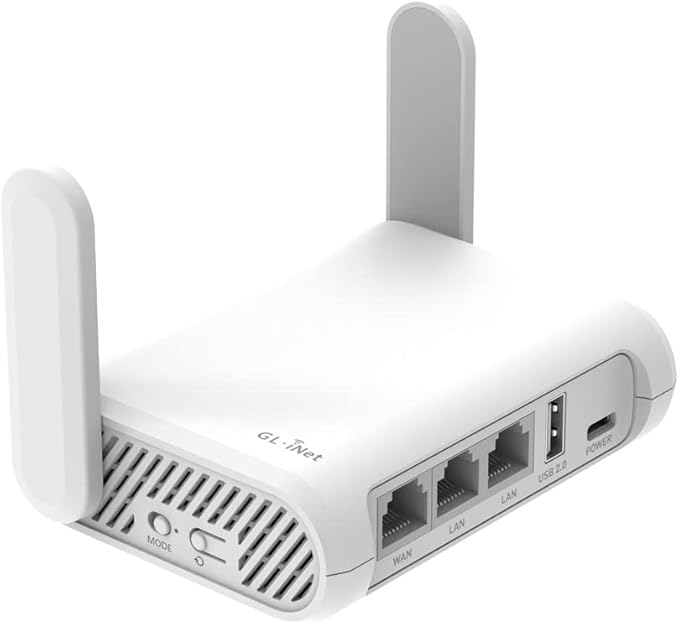
GL.iNet GL-SFT1200 (Opal) Secure Travel WiFi Router – AC1200 Dual Band Gigabit Ethernet Wireless Internet Router | IPv6 | USB 2.0 | MU-MIMO | DDR3 |128MB Ram | Repeater Bridge | Access Point Mode
About this item
【AC1200 Dual-band Wireless Router】Simultaneous dual-band with wireless speed up to 300 Mbps (2.4GHz) + 867 Mbps (5GHz). 2.4GHz band can handles some simple tasks like emails or web browsing while bandwidth intensive tasks such as gaming or 4K video streaming can be handled by the 5GHz band.
【Pocket-friendly】Lightweight design(145g) which designed for your next trip or adventure. Alongside its portable, compact design makes it easy to take with you on the go.
【Full Gigabit Ports】Gigabit Wireless Internet Router with 2 Gigabit LAN ports and 1 Gigabit WAN ports, ideal for lots of internet plan and allow you to connect your wired devices directly.
【Keep your Internet Safe】IPv6 supported. OpenVPN & WireGuard pre-installed, compatible with 30+ VPN service providers. Cloudflare encryption supported to protect the privacy.
【Repeater for Public WiFi】Convert a public network(wired/wireless) to a private Wi-Fi for secure surfing. In general, most of the Free Public Wi-Fi hotspot set a time limit for users, which will disconnect your devices once the time is over. To deal with this situation, please reconnect your router to the wifi. ***Do NOT support easytethering***
【Enable VPN Easily】Immediately enable/disable your selected feature(OpenVPN Client or WireGuard Client) through the physical toggle switch. ***The default setting of the button is NO Function, you need to set it in the admin panel before using this function.